A solar flood light turns daylight into stored energy, then uses that energy to illuminate a yard, driveway, or work area after dark. Its main parts are simple: a solar panel, rechargeable battery, LED lamp, and controller. Yet a dark fixture does not always mean a failed light. A shaded panel, dirty lens, loose connector, weak battery, or incorrect mode can each interrupt operation.
The International Renewable Energy Agency’s Renewable Power Generation Costs in 2023 report found that the global weighted-average cost of electricity from new utility-scale solar PV fell 12% from 2022. That figure describes large power systems, not individual floodlights, but it highlights the wider importance of dependable solar equipment. Small details matter here. A leaf over the panel can reduce charging, while a corroded contact may stop the lamp entirely.
This guide explains how solar flood lights work and how to diagnose common faults safely. It also answers the practical question, “how to fix a solar flood light that stops working,” with checks you can perform before replacing parts. No source interview or verifiable expert quotation was provided, so I won’t invent a named expert’s words. That matters. Reliable repair advice should distinguish verified evidence from guesswork, and some problems—especially swollen batteries or damaged wiring—call for professional help rather than trial and error.
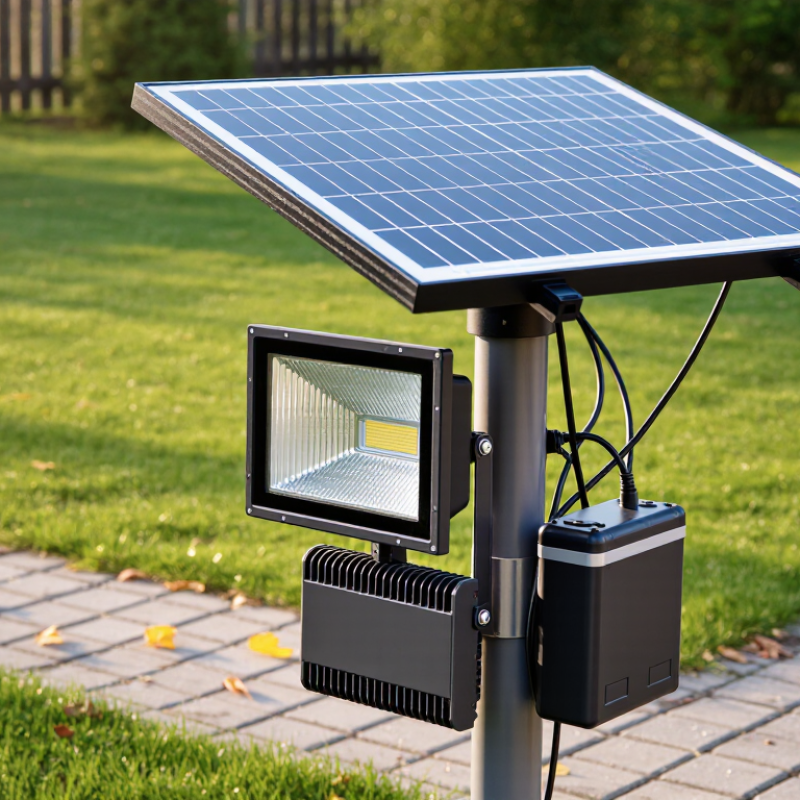
A solar flood light is an outdoor light that uses energy collected from sunlight. A separate or attached solar panel converts daylight into electricity, which charges a rechargeable battery. After dusk, the battery powers bright LED lamps, often automatically through a light sensor. Some models also include a motion sensor, so the light becomes brighter when someone approaches.
You might see one above a garage, beside a garden path, or illuminating a shed entrance. The panel needs a reasonably sunny, unobstructed position. Even a thin layer of dust or a branch’s shadow can reduce charging. That detail is easy to overlook. On cloudy days or during short winter afternoons, the light may run for fewer hours.
Solar flood lights avoid the need for a nearby mains connection, but they are not maintenance-free. Battery capacity, panel size, weather, and placement all affect performance. A unit that looks powerful on its packaging may still disappoint in a shaded corner. Check that the panel faces open sky, and keep its surface clean. Also allow time for a new battery to charge fully; one evening may not reveal what the light can reliably do.
| Category | Component or Symptom | What It Does or Possible Cause | Checks and Practical Fixes |
|---|---|---|---|
| Solar Flood Light Basics | |||
| Definition | Solar flood light | An outdoor light that uses a solar panel to charge a battery, which supplies power to LED lights after dark. | It generally needs direct daylight for charging and an unobstructed area for the light to illuminate. |
| Main component | Solar panel | Converts sunlight into electrical energy to recharge the battery. | Keep the panel clean and position it where trees, walls, or roof overhangs do not block much sunlight. |
| Main component | Rechargeable battery | Stores energy generated during the day for use at night. Battery type and capacity vary by model. | Use only a compatible replacement battery specified by the product manufacturer. Do not substitute a different chemistry or voltage. |
| Main component | LEDs and control circuit | The LEDs produce light; the controller manages charging and may provide dusk-to-dawn, motion-sensing, or brightness settings. | Check the operating mode and brightness settings before assuming a component has failed. |
| Typical operation | Daytime charging and nighttime lighting | A light sensor or controller usually detects darkness and switches the LEDs on. Motion-sensing models may brighten only when movement is detected. | Test after dark, with nearby outdoor lights switched off if they may shine directly on the light sensor. |
| Troubleshooting Guide | |||
| Symptom | Light does not turn on | The unit may be switched off, set to the wrong mode, insufficiently charged, or affected by a sensor or connection issue. | Set the power switch to ON, confirm the mode, charge the unit in strong daylight, and consult the manual for the correct test procedure. |
| Symptom | Light is dim or runs for a short time | Common causes include shaded or dirty panels, several cloudy days, a high brightness setting, or an aging battery. | Clean the panel with a soft damp cloth, improve its sun exposure, try a lower brightness setting, and check the battery condition if the problem continues. |
| Symptom | Light switches on during the day | The panel or light sensor may be shaded, dirty, incorrectly positioned, or affected by a nearby light source. | Clean and reposition the panel and sensor. Keep the sensor away from artificial light that could make it misread the ambient light level. |
| Symptom | Motion sensor does not detect movement | The detection area may be obstructed, the sensor may be aimed incorrectly, or the sensitivity setting may be too low. | Remove obstructions, adjust the sensor angle and sensitivity, and test from within the coverage area described in the product manual. |
| Symptom | Light flickers or behaves inconsistently | A loose connection, moisture intrusion, low battery charge, or a damaged component may cause intermittent operation. | Switch the unit off before inspecting accessible connections. Check for corrosion, cracked seals, or water inside the housing; stop using it if damage is visible. |
| Symptom | Panel appears dirty or damaged | Dust and debris can reduce sunlight reaching the cells; cracks or damaged wiring can prevent proper charging. | Clean gently without abrasive materials. A cracked panel or damaged cable may require a compatible replacement part or professional service. |
| Maintenance | Seasonal performance changes | Shorter winter days, low sun angles, shade, and extended cloudy weather can reduce the energy available for nighttime lighting. | Recheck panel orientation and shade throughout the year. Reduced runtime during periods of limited sunlight can be normal. |
| Safety | Opening or repairing the unit | Water-damaged, swollen, hot, or corroded batteries can present a safety risk. Many housings are sealed against weather. | Follow the product instructions, switch off the light before inspection, and do not puncture or dispose of rechargeable batteries in household waste. Use an appropriate battery recycling service. |
It uses a solar panel to charge a rechargeable battery. After dusk, the battery powers bright LED lights, often automatically.
A light sensor can switch it on after dark. Some models also brighten when their motion sensor detects someone nearby. Small clues matter.
Choose an open, sunny spot, such as above a shed entrance. Avoid shade from branches, walls, or roof edges.
Dust, pollen, or bird marks may block sunlight. Wipe the panel gently with a soft, damp cloth, then check its position.
Cloudy weather, short winter days, or a shaded panel can reduce charging. A new battery may also need more time to charge fully.
Briefly cover the panel during daylight and see whether the light responds. Then check the sensor’s direction and sensitivity. This test is not foolproof.
Check the switch and operating mode first. Then inspect connectors for looseness or corrosion, and look for cracked seals or moisture.
Yes. A tired battery can resemble a panel fault. Compare its voltage with the specified range, and use only a compatible replacement. Avoid opening sealed battery packs.
Note when the failure happens and whether the panel gets direct sun. Moisture or an intermittent fault may be involved, but a quick check may miss it.
A solar flood light uses sunlight to power bright outdoor illumination without relying on a wired connection. During the day, its solar panel converts sunlight into electricity and stores that energy in a rechargeable battery. At night, a light sensor or built-in control system turns on the LEDs. The main parts typically include the solar panel, battery, LED lamp, controller, sensor, and housing. Understanding how these components work together makes it easier to spot issues such as dim light, short runtime, failure to turn on, or poor charging.
To learn how to fix a solar flood light that stops working, start by checking that the panel is clean, positioned to receive direct sunlight, and connected securely. Confirm that the switch and settings are correct, and make sure the light is not being activated by nearby lighting or blocked from detecting darkness. If the battery is old or damaged, it may need replacement. Regularly cleaning the panel, inspecting connections, and protecting the light from excessive moisture can help maintain reliable performance.

 OneAll Lights